Scheduled Room Moves
The Scheduled Room Moves menu allows properties to manually schedule room moves for all reservations at a specific time. The list of room moves that are scheduled for the current property date will be displayed in the screen. Users can choose to retain or process the room moves for each reservation from this screen.
Breakpoint: 300060 - Scheduled Room Moves (Front Office - Front Desk)
Navigate to Front Desk à Scheduled Room Moves.
Select the preferred reservation from the list displayed in the grid.
Users can also choose multiple or all reservations by clicking the checkbox next to each reservation. If the checkbox at the top of the grid is clicked, all reservations listed in the grid will be selected.
Additionally, users can search for reservations by guest name, confirmation number and room number using the Search field. They can also apply the Booking ID/Name and/or Room Type filters to refine the reservation search process.
Click Retain or Process.
On clicking Retain, the message, Do you want to retain for the entire stay, will be displayed. Users can either click Yes to retain the guest in the current room for all remaining stay dates or No to retain the guest in the current room for a single day matching the property date.
On clicking Process, the selected rooms will be scheduled to be moved.
Scheduled Room Moves Screen
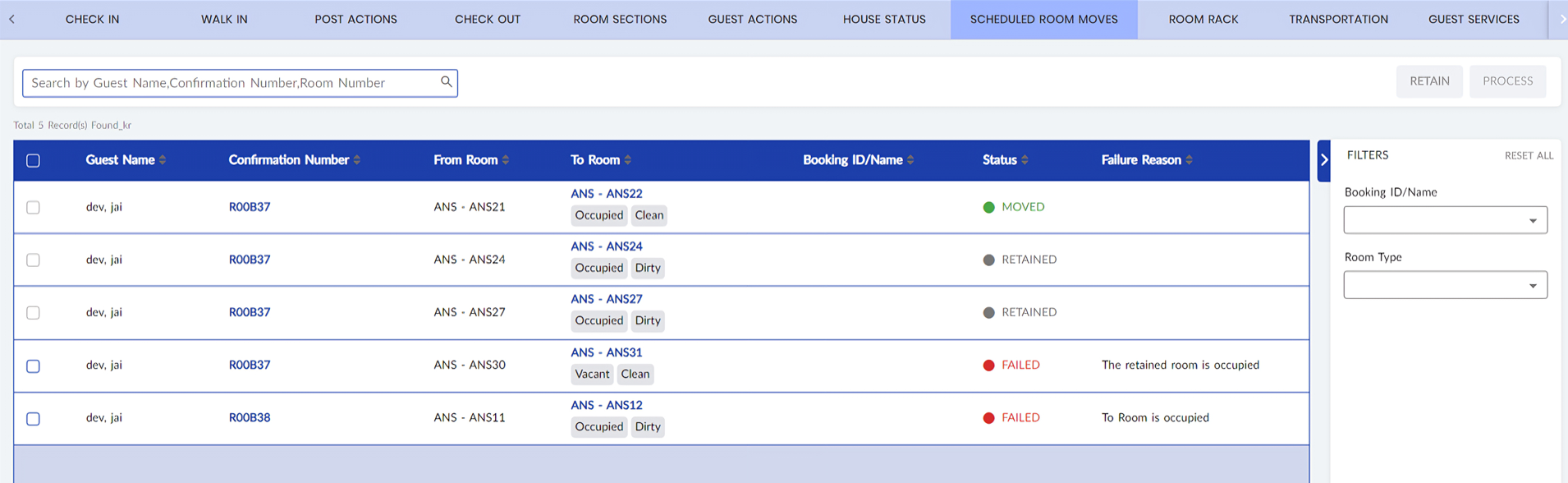
The grid includes the following columns:
-
Guest Name - The last and first names of the guest
-
Confirmation Number - The confirmation number of the reservation.
-
From Room - The existing room type and room number assigned to the reservation.
-
To Room - The new room type and room number assigned to the reservation along the condition of the room.
-
Booking ID/Name - The booking ID or name associated with the reservation.
-
Status - The status of the scheduled room move. The list of statuses include:
-
Scheduled
-
Moved
-
Retained
-
Failed
-
-
Failure Reason - The reason for which the scheduled room move has failed.